Reference implementation: MCP responses
This runnable reference explains the proposed response patterns and lets us observe a real client's behavior. It demonstrates success, denied requests, temporary failures and tool errors. It implements no real authentication or permission checks and makes no WorkOS calls.
Download the single-file Scala server. Use Scala CLI and JDK 21 or newer. The file declares Scala 3.8.2, Chimp 0.6.0, Tapir/Netty 1.13.31 and SLF4J 2.0.17. Dependencies download on the first run. Scala, Tapir and SLF4J match Platform's current build; using this reference does not require a Platform dependency upgrade. Chimp is an additional dependency for this reference. Scala CLI may suggest newer versions; those hints are expected. Production integration remains a separate validation.
Use the implementation test plan when testing the real foundation. This reference supplies client-presentation examples, not passing results for its authentication or permission controls.
Run
From the Planning checkout:
scala-cli run drafts/remote-mcp/assets/mcp-response-test.scala --server=false -- success call 8765For the downloaded file:
scala-cli run mcp-response-test.scala --server=false -- success call 8765Connect with Streamable HTTP at http://127.0.0.1:8765/mcp, without
OAuth, bearer tokens or custom headers. The server exposes exactly two tools:
| Tool | Successful result |
|---|---|
hello_read |
Hello. |
hello_write |
Your MCP write permission was verified. No data was changed. |
In success mode, both tools work without restarting the server. Use
try hello_read for the read scenario and try hello_write for the write
scenario. Both tools are non-mutating; the selected mode simulates the access
outcome rather than checking real permissions.
If replacing the earlier single-tool reference, stop it and start this file
again. Refresh the client's MCP tools or start a new chat so it discovers
hello_read and hello_write instead of the former probe_response.
The server uses no real accounts or business data and makes no outbound calls.
Arguments select the response, failure point and port. Stop with Ctrl-C before changing the case on the same port. For example:
scala-cli run mcp-response-test.scala --server=false -- http403-write call 8765The fixture closes client connections immediately on shutdown rather than waiting for Netty's default ten-second grace period. Netty's event-loop cleanup still takes a few seconds; wait for the process to exit before restarting. In a local check with an open keep-alive connection, Ctrl-C took about 14 seconds with the default settings and about 4 seconds after this change. These are observed timings, not a shutdown-time guarantee.
Responses
These fixed messages match the specification. The client controls presentation.
| Case | Response to the tool |
|---|---|
success |
Both tools succeed: hello_read returns Hello.; hello_write returns the no-change write-permission confirmation. |
write-success |
Compatibility alias for success; both tools are available. |
http401 |
HTTP 401, invalid_token: Sign in to connect to DataDescriber. |
http403 |
HTTP 403, mcp_read_required: Your account does not have MCP read access for this tenant. Contact your tenant administrator. |
http403-write |
hello_write returns HTTP 403, mcp_write_required: Your account does not have MCP write access for this tenant. No data was changed. Contact your tenant administrator. In call mode, hello_read still succeeds. |
http403-tenant |
HTTP 403, tenant_mcp_disabled: MCP is not enabled for this tenant. Contact your tenant administrator. |
http503 |
HTTP 503, mcp_access_unavailable: MCP access could not be checked right now. Try again later. |
tool-error |
HTTP 200, MCP isError: true: The demonstration tool could not complete. |
HTTP failures contain JSON with code, message and a generated
correlationId. The 401 includes a Bearer invalid_token challenge.
The 403 cases include no OAuth challenge; the 503 includes Retry-After: 5.
With call, initialization and discovery succeed; the selected failure occurs
on a tool call. To reject connection/discovery instead:
scala-cli run mcp-response-test.scala --server=false -- http403 connection 8765Use connection only with an HTTP failure case. Only the operator selects
the case; tool arguments cannot change it. The case repeats on every attempt.
Record new connections and retries separately because the client may cache tools.
After a restart, verify readiness before testing to avoid confusing startup
outages with the intended response.
Both tools remain advertised in the fixture so a client can exercise a denied write directly. Production discovery must omit a write tool unavailable to a read-only account; this fixed-response server does not implement permission-based discovery or authorization.
Reading the code
Read the single file from the top: command-line entry point and server startup, the two explicit tool definitions, then endpoint registration. The result helper, shared types, HTTP error helpers and safe request logging follow below. Seven numbered comment blocks explain the purpose of each section.
The functions divide responsibilities as follows:
httpFailureselects the fixed status, category and message.errorReplycreates the bounded JSON body.httpExceptionHandlermaps synthetic failures to actual HTTP responses.probeResultapplies the selected failure case and returns the result for the read or write tool. A write-only denial leaves the read result available.helloReadToolexplicitly definestool("hello_read"), its description, input and read-result handler.helloWriteToolexplicitly definestool("hello_write"), its description, input and write-result handler.probeAnnotationsdeclares their shared non-mutating hints.mcpEndpointcreates the Tapir endpoint, checks Host/Origin and optionally rejects connection/discovery.requestLogrecords timing, method, known paths and response status.startServerruns Netty on loopback.mcpResponseTestis the main method and validates launch arguments.
Chimp handles MCP; Tapir handles HTTP. Injecting HTTP failures from the tool is test plumbing, not the production authorization boundary. Real denied requests must be stopped before a handler runs. The write-success case verifies no grant.
The two tool definitions are marked MCP TOOL 1 and MCP TOOL 2 in the file.
mcpEndpoint registers exactly List(helloReadTool(mode), helloWriteTool(mode));
the names are not generated by a shared tool factory.
Limits
There is no OAuth provider, token validation, WorkOS integration, tenant lookup
or permission enforcement. OAuth implementation and verification of successful
Reconnect belong to the later implementation work, not this reference server.
Chimp's non-streaming JSON-response transport handles
the MCP messages; SSE and other protocol features are outside this experiment.
The server binds only to loopback and checks Host/Origin. Its request log records
timestamps, methods, allowlisted paths and response status only. Unknown paths
appear as <other>; headers, query values, bodies and exception detail are omitted.
The raw 401 has no protected-resource metadata or OAuth provider. It cannot validate account linking, consent or credential renewal. See OpenAI authentication guidance.
A cloud-hosted client cannot reach this computer through its own
127.0.0.1; it needs a separately arranged HTTPS endpoint or supported tunnel.
No public listener or tunnel is created by this reference.
Recorded client experiment
On 22 October 2026, a new local chat in the desktop app displayed as ChatGPT
invoked the installed test / probe_response MCP tool. Its chat backend
identifies itself as Codex; the app version was not recorded. These observations
apply to that local integration, not cloud-hosted ChatGPT or Claude.
Each trial used a real installed MCP tool call. The expected error messages were withheld from the tester. Direct HTTP checks separately confirmed each server case before valid error trials.
| Server case | Observed by the test chat |
|---|---|
| Success | Hello., isError: false. |
| Missing read | HTTP 403, mcp_read_required and the full administrator guidance in a transport error. |
| Missing write | HTTP 403, mcp_write_required and the full no-change/administrator guidance in a transport error. |
| Tenant disabled | HTTP 403, tenant_mcp_disabled and the full administrator guidance in a transport error. |
| Dependency unavailable | HTTP 503, mcp_access_unavailable and the full retry message in a transport error. |
| MCP tool error | The fixed message and MCP isError: true, without a transport error. HTTP status was not shown to the tester. |
| Raw 401 | Only Authentication required. The tester did not receive the server's status, category or message. No sign-in was attempted. |
| Success after errors | The same connection returned Hello. again without configuration changes or sign-in. |
An initial write-denial attempt coincided with a failed server restart, producing an empty HTTP 503 from the client path. It is excluded from the intended error observations. The repeated trial after readiness returned the full expected 403.
The platform also marks transport failures with its own isError: true
wrapper. That is not a server MCP result. The raw 401 and later restoration do
not establish OAuth recovery or credential renewal.
These original experiments used the earlier single-tool probe_response
fixture. The reference now exposes hello_read and hello_write to match the
two-tool specification. The captures remain historical evidence of response
presentation; they do not claim the two new names were used in those runs.
The tester reports establish which information reached the model and appeared in its reply. The screenshots below add observations of the visible reconnect notices; other dialogs and automatic retry behavior remain unverified. Claude's remote connector form rejected the loopback URL because it connects from Anthropic's servers; no Claude invocation or public exposure was performed.
Owner-run HTTP error trials
The owner supplied a screenshot of a separate chat, Prova probe_response,
after manually switching the server between success and the five HTTP error
cases. The screenshot summarizes the whole sequence as observed in the client UI.
The visible conversation shows Hello., followed by:
| Server case selected by the owner | Visible assistant reply |
|---|---|
http401 |
Authentication required., without the server's explanatory message or reason code. |
http403 |
HTTP 403 and mcp_read_required, with a Swedish explanation of missing read access and advice to contact the tenant administrator. |
http403-write |
HTTP 403 and mcp_write_required, with a Swedish explanation of missing write access and confirmation that no data changed. |
http403-tenant |
HTTP 403 and tenant_mcp_disabled, with a Swedish explanation that MCP is disabled for the tenant and advice to contact its administrator. |
http503 |
HTTP 503 and mcp_access_unavailable, with a Swedish explanation that access could not be checked and advice to try again later. |
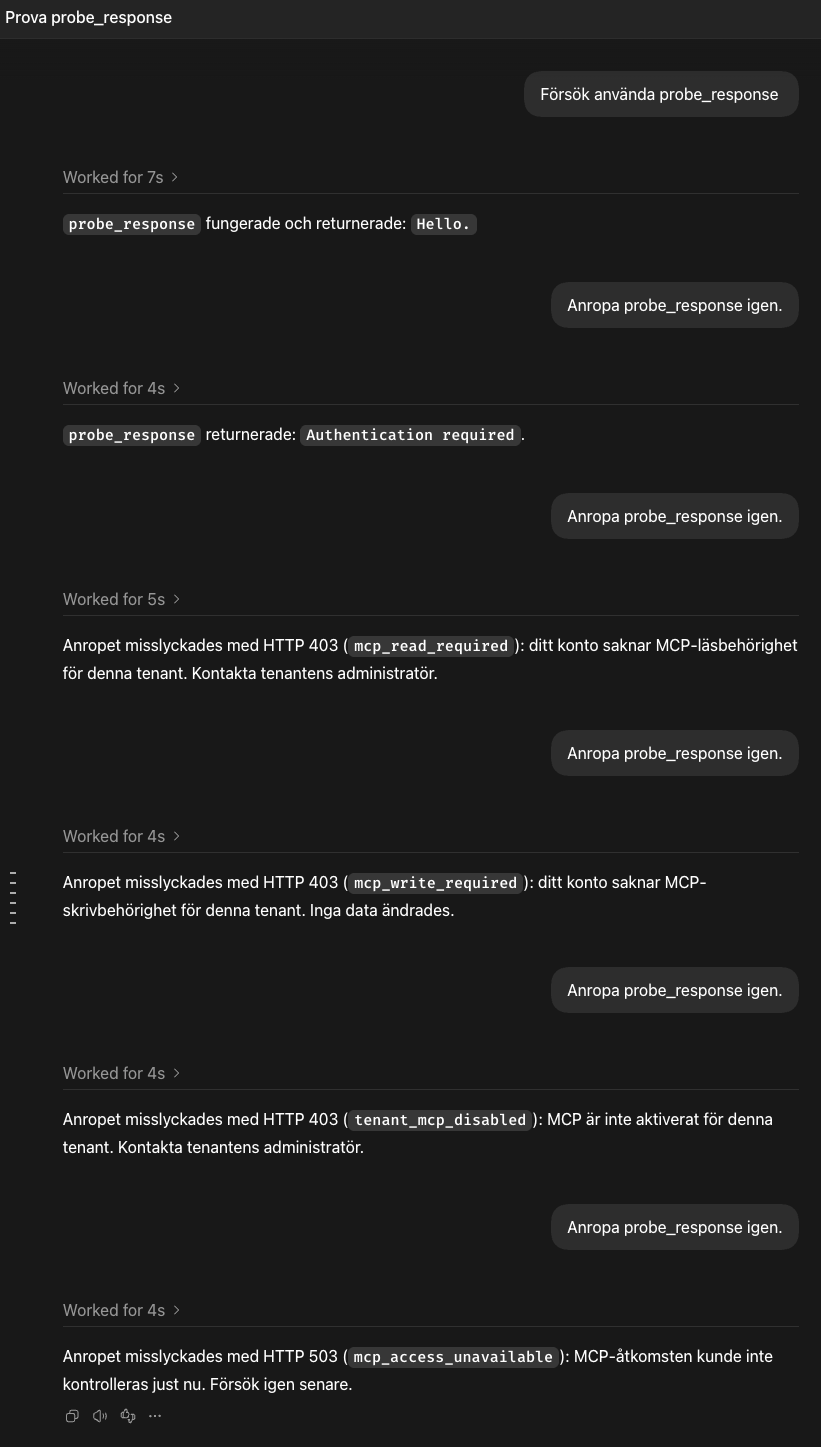
This captures the assistant's visible replies, which may paraphrase the server's message. It does not show raw tool responses or establish that every part of a message will always be presented. It corroborates the earlier distinction: the authentication case becomes a generic sign-in message, while permission and availability failures can reach the conversation with useful explanations.
English prompt and reply captures
The owner repeated the experiment with the exact prompt try probe_response.
The capture shows success, raw 401, success again, missing read permission,
tenant-disabled and temporary lookup failure. The restored success reply appears
in the same conversation after the authentication error. A second capture adds
the missing write-permission case.
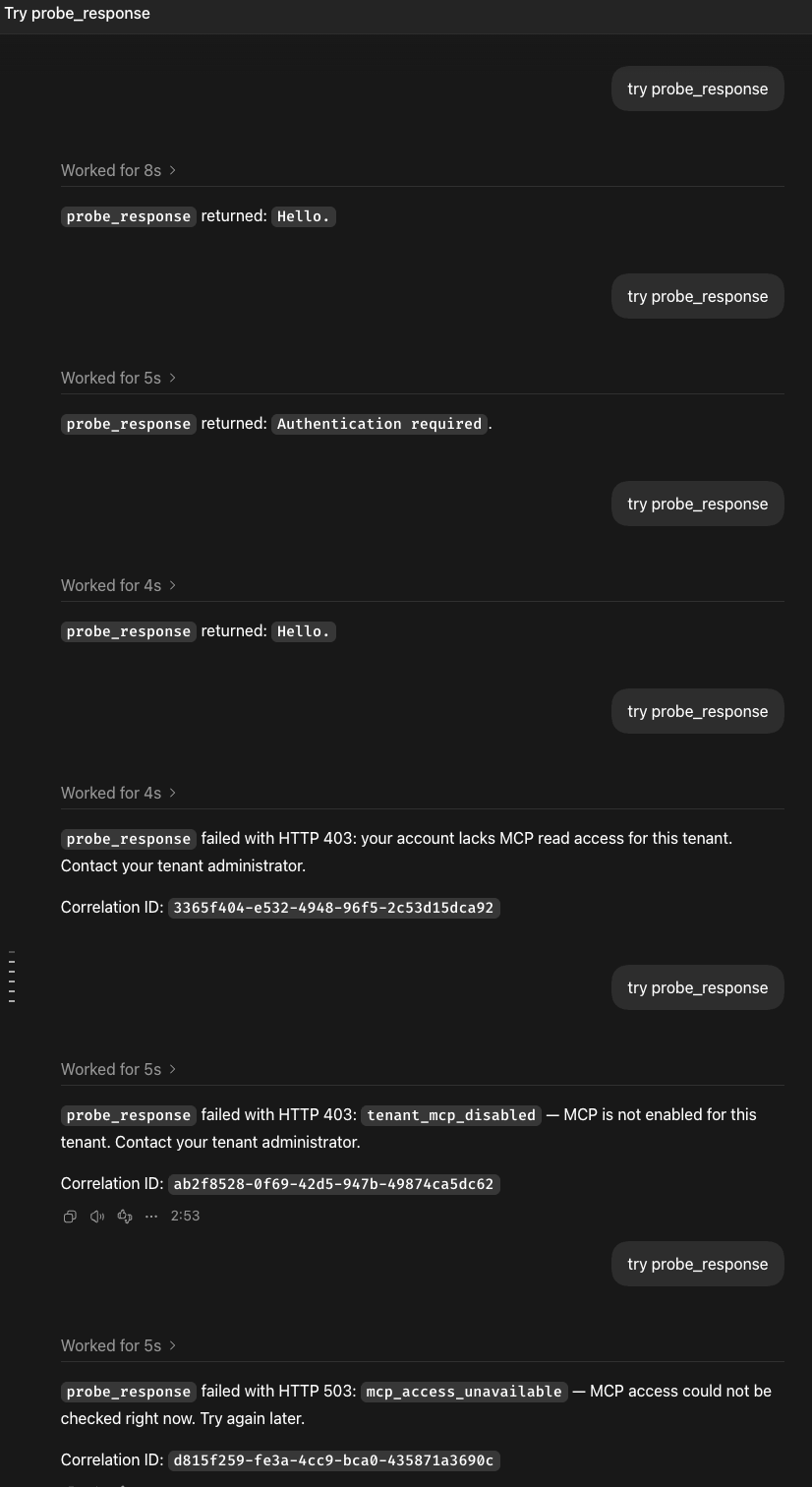
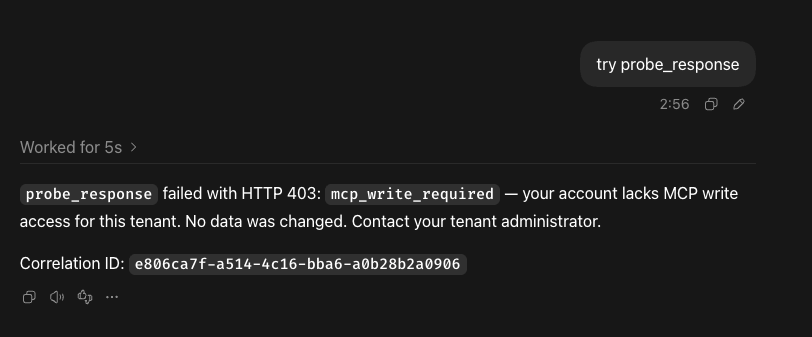
The mockup follows the prompt and visible reply structure from these captures,
with tool names corrected to hello_read or hello_write for the specified
read and write scenarios.
The read-denial reply omits the reason code, while the write, tenant and service
failures include it. The permission and service replies also show correlation
IDs. Those IDs identify the captured test requests; they are not constants in
the server. Client replies may paraphrase or omit parts of an error in another
conversation. The write-success demonstration is not shown in these captures.
Two-tool success trial
After the reference was corrected to expose two tools, the owner invoked them
one at a time in a new chat, with the server in success mode:
| Prompt | Visible assistant reply |
|---|---|
try hello_read |
hello_read returned: “Hello.” |
try hello_write |
hello_write succeeded: MCP write permission was verified. No data was changed. |
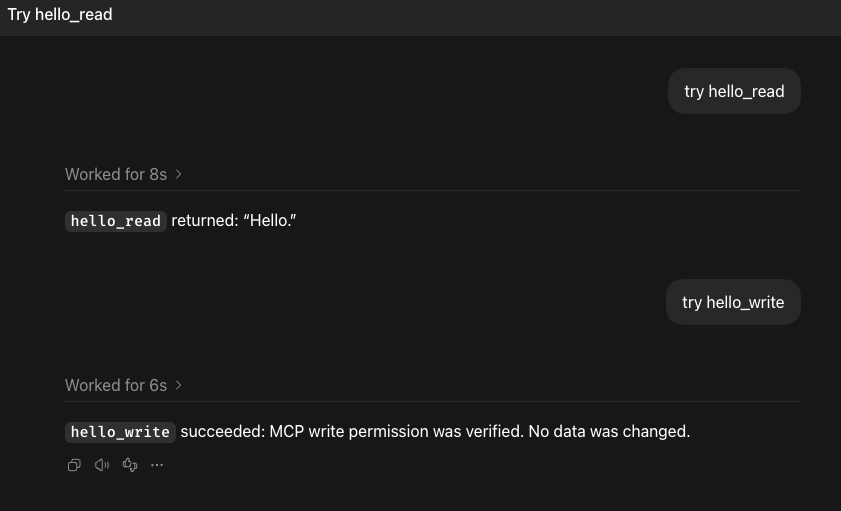
This confirms the client's use of both named tools in the same conversation. The mockup's successful read and write replies now copy this capture. The write reply paraphrases the fixed server text; it does not establish real permission checking or business-data mutation. It also does not verify OAuth recovery.
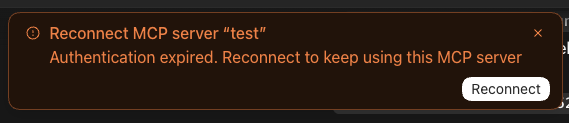
The owner then selected http401 and sent try hello_read. The visible reply
was hello_read returned: Authentication required. The same capture shows the
client's Reconnect notice for the saved server named test, explaining that
authentication expired and offering Reconnect. No HTTP status, server reason
code or server-owned explanation appears in the assistant reply.
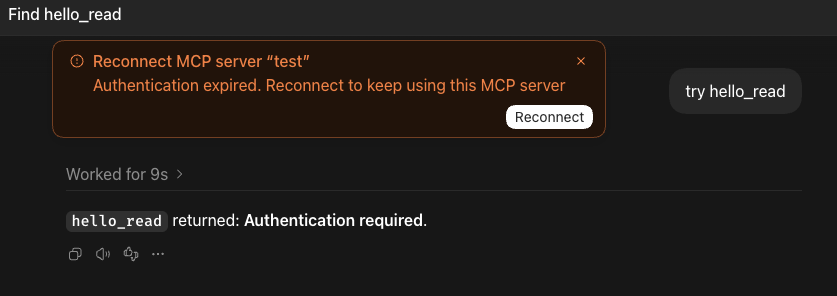
This verifies the 401 presentation with the corrected read-tool name. It does not verify genuine token expiry or a completed OAuth reconnect.
The owner also sent try hello_write in the http401 case. Its visible reply
was: hello_write returned “Authentication required.” No data was changed.
The same Reconnect notice appeared. The no-change sentence is part of the
client's reply; the raw 401 fixture message itself is unchanged.
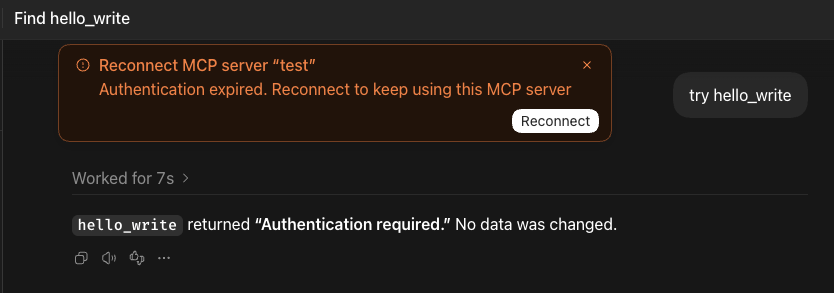
Both named tools therefore produced a generic authentication reply and a
client reconnect notice in the owner-run 401 trials. The recovery mockup uses
the captured hello_read version; this write-tool capture records the additional
wording without implying a separate authorization or recovery mechanism.
Two-tool missing-read trial
With the server in http403 mode, the owner tried both tools. The visible
replies were:
try hello_read→hello_readfailed with HTTP 403 (mcp_read_required): your account lacks MCP read access for this tenant. The server says to contact your tenant administrator. Correlation ID:17f6f0cf-90cb-4243-aa5c-68f98c670104.try hello_write→hello_writefailed with HTTP 403 (mcp_read_required): your account lacks MCP read access for this tenant. Correlation ID:48967e4e-9fab-459c-a772-46a259747b72.
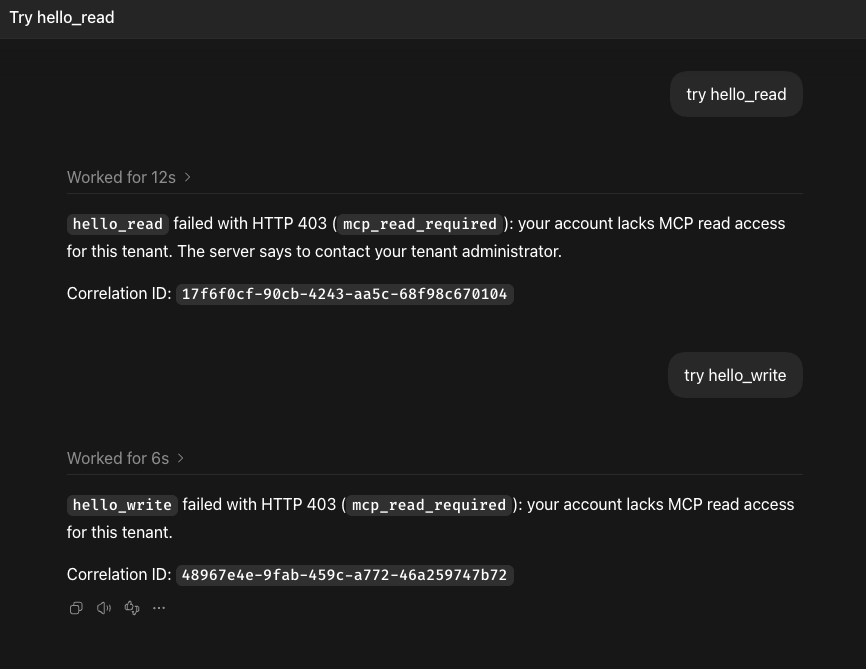
This client trial shows that the simulated read-access denial affects both tools. It is consistent with the specification requiring read access for the write tool as well. The client repeated the administrator guidance only for the read-tool reply in this capture. The read-denial mockup now copies that reply, including its reason code and captured correlation ID.
Two-tool write-only denial trial
The owner then tried both tools with a simulated write-only denial. The visible conversation shows:
try hello_read→hello_readsucceeded: “Hello.”try hello_write→hello_writefailed with HTTP 403: your account lacks MCP write access for this tenant. No data was changed. Contact your tenant administrator to enable access.
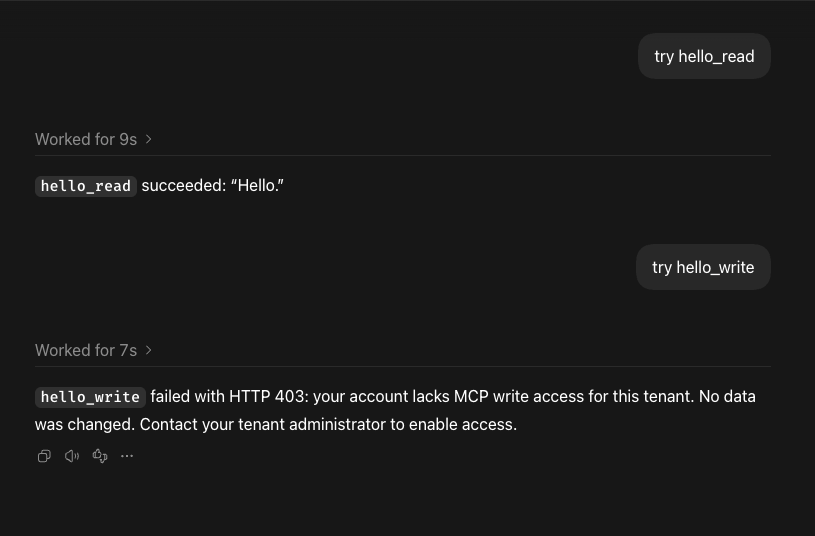
The client omits the reason code and correlation ID in this capture. Scenario 4 now copies this conversation: a successful read is already visible, then the reviewer sends the write request and receives the captured denial. This client trial confirms that a write-only denial leaves the fixture's read tool usable; it does not establish real permission enforcement.
Two-tool tenant-disabled trial
The owner tried both tools with the tenant-disabled case selected. The visible read-tool reply was:
hello_readfailed with HTTP 403:tenant_mcp_disabled.The server reports that MCP is not enabled for this tenant and requires a tenant administrator to enable it.
The visible write-tool reply was:
hello_writefailed with HTTP 403:tenant_mcp_disabled.MCP is not enabled for this tenant; a tenant administrator must enable it.
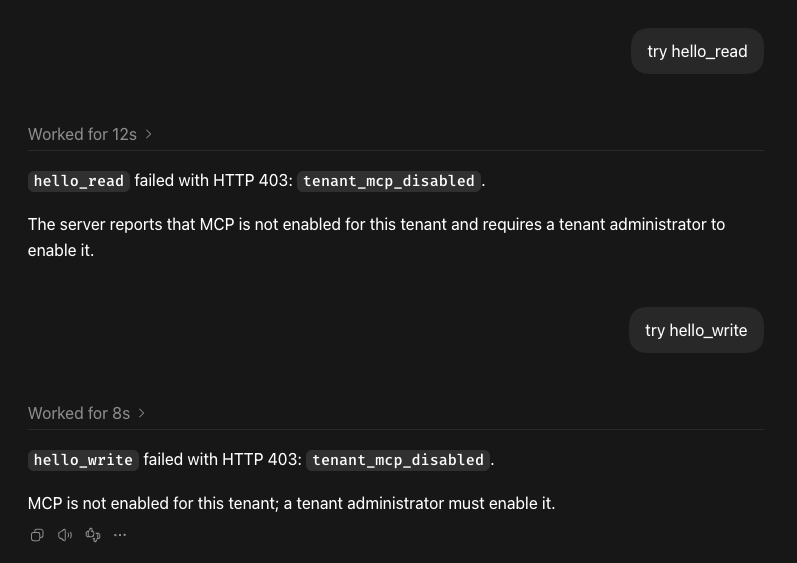
Neither reply displays a correlation ID in this capture. Scenario 6 now copies the read-tool reply, including its separate explanatory paragraph. Both replies identify the tenant-level condition and administrator action, rather than asking for a new sign-in. The fixture simulates the condition; it does not read a real tenant capability.
Two-tool temporary-failure trial
With the temporary access-lookup failure selected, both visible replies say:
hello_readfailed with HTTP 503:mcp_access_unavailable— “MCP access could not be checked right now. Try again later.”Correlation ID:
d148a72d-68bc-462c-ad2c-7c7005d81c3b
hello_writefailed with HTTP 503:mcp_access_unavailable— “MCP access could not be checked right now. Try again later.”Correlation ID:
4d25de82-d06a-415c-930b-a1fd12b2da50
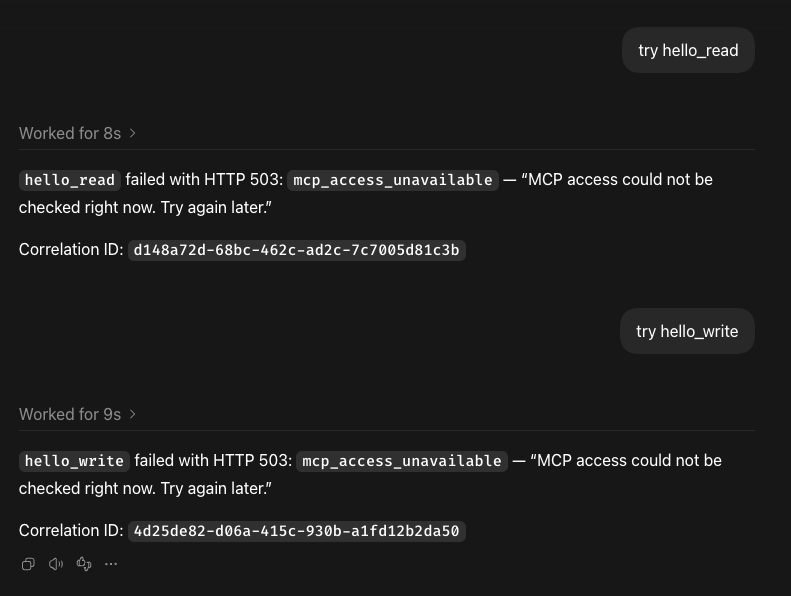
Scenario 8 copies the read-tool reply, including the quoted explanation and captured correlation ID. Both replies identify a temporary failure and suggest retrying later; neither asks the person to sign in again. The fixture does not contact WorkOS, so this establishes presentation of its simulated failure only.
The owner also supplied a raw write-denial tool error, classified by the client as an unexpected HTTP 403 transport response. Its correlation ID matches the write-denial screenshot. This ties that visible reply to the supplied HTTP error body; it is not a server MCP tool-error result. The raw dump is omitted here; the screenshots provide the presentation evidence.
Risk of losing a tool after a server outage
A server outage may leave an MCP tool unavailable in an existing chat even
after the server is running again. In a later manual trial, the client removed
probe_response from the chat's available tools while the server was stopped.
No tool invocation took place. The owner reported that the existing chat still
could not use the tool after the server restarted, while a new chat succeeded.
This is an observed risk in the tested local client, not a general MCP rule. Server recovery alone may not restore tool availability in a running chat; starting a new chat worked in this trial. The client version was not recorded, and the internal reason for removing the tool was not established.
Visual reconnect attempt
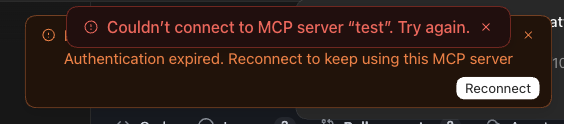
The owner supplied screenshots of the desktop app after the raw 401 trial. The app displayed Reconnect MCP server "test" and Authentication expired. Reconnect to keep using this MCP server, with a Reconnect button. This is the client's wording; the fixture does not actually expire credentials.
The owner clicked Reconnect. A second notification said Couldn't connect to MCP server "test". Try again. The original authentication notice remained.
After that attempt, direct HTTP checks confirmed a successful MCP initialize
response and probe_response returning Hello.. The server was still in
the success case. Thus a working endpoint and successful tool call do not by
themselves establish that the client's Reconnect action succeeds.
The notification does not identify the cause. The fixture has no OAuth provider or protected-resource metadata, but these screenshots alone do not prove which step failed or whether the client attempted OAuth. Full reauthentication remains unverified. Keep the successful tool retry and the failed UI reconnect as separate observations.
After another manual server restart, the request log captured connection activity:
GET /mcp returned 405; GET /.well-known/oauth-protected-resource/mcp,
/.well-known/oauth-protected-resource and
/.well-known/oauth-authorization-server returned 404. Subsequent POST /mcp
requests returned 200, 202 and 200. This confirms that connection traffic reaches
the server and that OAuth metadata is absent. A later Reconnect attempt also
sent POST /register, which returned 404 because the fixture has no client
registration endpoint. The owner again reported the failed-connect notification.
These requests show attempted OAuth discovery and registration, not successful
OAuth recovery.
In a further manual trial, the owner restarted the fixture in success mode,
dismissed the authentication notice instead of choosing Reconnect, and reported
that tool calls worked again in the same chat. The notice therefore did not by
itself make that chat permanently unusable. Retrying a tool after restoring the
fixture and running the client's Reconnect flow are different operations: the
former recovered in this trial, while the latter failed against a server with
no OAuth implementation. This does not establish recovery from genuinely expired
credentials, because the fixture checks no credentials at all. It is also
separate from the server-outage trial above, where a tool was removed from the
chat's available tools.
Repeatable checks
The separate black-box checks launch the Scala server and verify initialization, notifications, discovery of exactly two non-mutating tools, both successful results in one server run, continued read access during a write-only denial, the exact five HTTP error messages at both failure points, MCP tool errors and Host/Origin rejection:
python3 drafts/remote-mcp/tests/test_response_server.pyThey need Scala CLI and JDK 21+, but no Python packages. They verify wire behavior and that synthetic secrets in headers, query values and tool arguments do not appear in the request log. They do not verify real authorization, client presentation or Product acceptance.
The Scala file is formatted with Platform's Scalafmt 3.8.3 configuration.
References: Chimp HTTP transport and security, Streamable HTTP and MCP tool results.